sublimation ink cannot be used for regular printing in the way most people expect.
Unlike standard dye or pigment inks, sublimation ink only works when heat is applied, allowing the ink to turn into gas and bond with polyester materials or specially coated surfaces. If you try to use it on regular paper without heat, the result is usually very light, faded, and easily wiped-off prints.
At Winnerjet, with over 20 years of experience in ink manufacturing, we’ve seen many users make this exact mistake—often thinking their printer or ink is defective, when in reality, it’s simply being used in the wrong way.
However, the full answer is more nuanced. There are specific scenarios and workflows where sublimation ink can still be part of a “regular printing” process—just not in the way you might think.
👉 In the next section, we’ll break down how sublimation ink actually works and why it behaves so differently from standard inks.

What Is Sublimation Ink and How Does It Work?
To understand why sublimation ink doesn’t work for regular printing, you first need to understand how it actually works.
Sublimation ink is a specialized heat-transfer ink. Instead of staying on the surface like regular dye or pigment inks, it is designed to turn into gas under high temperature (typically 180–200°C) and permanently bond with polyester fibers or polymer-coated materials.
This process is called sublimation, where the ink skips the liquid stage and goes directly from solid to gas. Once activated by heat and pressure (usually with a heat press), the ink penetrates the material and becomes part of it—resulting in vibrant, durable, and wash-resistant prints.
At Winnerjet, after decades of formulation and testing, we’ve seen that the performance of sublimation ink depends heavily on three key conditions:
- Heat (to activate the ink)
- Pressure (to ensure proper transfer)
- Compatible materials (polyester fabrics or coated surfaces)
Without all three, sublimation ink simply cannot perform as intended.
👉 This is exactly why problems occur when users try to treat it like regular ink—we’ll explain the core reasons in the next section.
Why Sublimation Ink Doesn’t Work for Regular Printing
What Happens If You Try Using Sublimation Ink for Regular Printing?
English Version:
So what actually happens if you ignore the differences and use sublimation ink like regular ink?
In real-world scenarios, the results are almost always disappointing—and often confusing for first-time users. Based on feedback we’ve received over the years at Winnerjet, here’s what typically happens:
1. Extremely Faded Prints
The most common result is a print that looks very light, dull, or “washed out.” This is because the ink hasn’t been heat-activated, so the colors never fully develop.
2. Powdery or Easy-to-Smudge Surface
Since the ink doesn’t bond with regular paper, it may feel dry but unstable, and can sometimes be smudged or rubbed off easily.
3. Colors Look “Wrong” or Incomplete
Sublimation prints before transfer often look flat or inaccurate in color. This is normal in sublimation workflow—but confusing if you expect a finished print directly from the printer.
4. Users Think Something Is Broken
One of the most common situations we’ve seen is users assuming:
- The printer is faulty
- The ink is low quality
- The settings are incorrect
But in reality, the system is working exactly as designed—it’s just being used outside its intended application.
At Winnerjet, we’ve helped many customers troubleshoot this exact issue, and in almost every case, once proper heat transfer is applied, the “problem” disappears completely.
👉 But here’s where it gets interesting: are there any situations where sublimation ink can still be used in a workflow that looks like regular printing? Let’s explore that next.
Now that you understand how sublimation ink works, it becomes clear why it fails in regular printing scenarios. The issue is not the printer—it’s the fundamental difference in how the ink interacts with materials.
Based on our long-term testing and customer feedback at Winnerjet, the failure usually comes down to three core reasons:
1. No Bonding on Regular Materials
Regular printing relies on ink staying on the surface of paper. But sublimation ink is designed to bond only with polyester or coated surfaces under heat. On normal paper, it simply sits loosely on the surface without proper adhesion.
2. No Heat Activation = No Color Development
Sublimation ink does not show its true color until it is activated by high temperature. Without heat, prints will appear extremely dull, washed out, or even nearly invisible. This often leads users to think something is wrong with the ink.
3. Paper Is Not the Final Medium
In sublimation printing, paper is only a transfer carrier, not the final destination. The real image only appears after transferring onto fabric or coated items. Using it as a final print on paper goes against its entire design logic.
In our experience, many first-time users assume sublimation ink should behave like regular ink—but in reality, it follows a completely different system.
👉 So what actually happens if you try it anyway? In the next section, we’ll show you the real-world results and common mistakes users encounter.
What Happens If You Try Using Sublimation Ink for Regular Printing?
So what actually happens if you ignore the differences and use sublimation ink like regular ink?
In real-world scenarios, the results are almost always disappointing—and often confusing for first-time users. Based on feedback we’ve received over the years at Winnerjet, here’s what typically happens:
1. Extremely Faded Prints
The most common result is a print that looks very light, dull, or “washed out.” This is because the ink hasn’t been heat-activated, so the colors never fully develop.
2. Powdery or Easy-to-Smudge Surface
Since the ink doesn’t bond with regular paper, it may feel dry but unstable, and can sometimes be smudged or rubbed off easily.
3. Colors Look “Wrong” or Incomplete
Sublimation prints before transfer often look flat or inaccurate in color. This is normal in sublimation workflow—but confusing if you expect a finished print directly from the printer.
4. Users Think Something Is Broken
One of the most common situations we’ve seen is users assuming:
- The printer is faulty
- The ink is low quality
- The settings are incorrect
But in reality, the system is working exactly as designed—it’s just being used outside its intended application.
At Winnerjet, we’ve helped many customers troubleshoot this exact issue, and in almost every case, once proper heat transfer is applied, the “problem” disappears completely.
👉 But here’s where it gets interesting: are there any situations where sublimation ink can still be used in a workflow that looks like regular printing? Let’s explore that next.
Are There Any Exceptions? When Sublimation Ink Can Be Used in a Printing Workflow
While sublimation ink cannot be used for regular printing in the traditional sense, there are specific scenarios where it can be part of a workflow that may look similar to “regular printing.”
At Winnerjet, we often explain this as a “two-step printing process” rather than direct printing. Here are the most common exceptions:
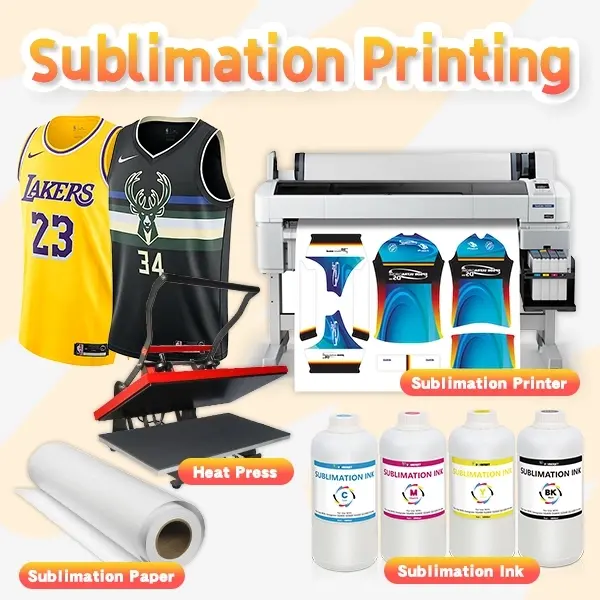
1. Using Sublimation Paper as an Intermediate Step
You can print onto sublimation transfer paper using a compatible printer. At this stage, the output may look faded or dull—but this is completely normal. The paper is not the final product; it’s just a carrier.
2. Heat Transfer to Final Materials
After printing, you apply heat and pressure (usually with a heat press) to transfer the image onto:
- Polyester fabrics (T-shirts, sportswear)
- Polymer-coated items (mugs, phone cases, metal plates)
Only after this step will the colors become vivid, sharp, and permanent.
3. Special Coated Surfaces (Limited Cases)
In some cases, specially coated papers or substrates can receive sublimation ink and then be heat-treated. However, these are engineered solutions, not standard office printing scenarios.
From our experience, many users confuse the printing step with the final result. In sublimation, what you see on paper is only half of the process.
👉 This is why choosing the right ink for your actual application is critical—next, we’ll show you the best alternatives depending on what you really want to achieve.
Best Alternatives: Choosing the Right Ink for Your Printing Needs
If sublimation ink isn’t suitable for regular printing, the next question is: what should you use instead?
The answer depends entirely on your application. At Winnerjet, we always recommend choosing ink based on the final material and use case, not just the printer. Here’s a practical guide:
1. For Everyday Paper Printing → Dye Ink or Pigment Ink
If your goal is standard document or image printing on paper:
- Dye ink: brighter colors, ideal for photos
- Pigment ink: better durability, water resistance, and sharp text
These are designed to bond with paper directly, unlike sublimation ink.
2. For Cotton or Mixed Fabrics → DTG Ink
If you want to print on cotton T-shirts or garments, sublimation won’t work effectively. Instead, you should use DTG (Direct-to-Garment) ink, which is specifically formulated to adhere to natural fibers.
3. For Polyester & Hard Surfaces → Sublimation Ink
If your application involves:
- Polyester fabrics
- Coated mugs, metal, plastics
Then sublimation ink is still the best choice—but only when used with the proper heat transfer process.
From our 20+ years of manufacturing experience at Winnerjet, one of the most common (and costly) mistakes is trying to use one ink for all purposes. In reality, each ink type is engineered for a specific system—and using the right one not only improves results but also avoids wasted materials and time.
👉 In the next section, we’ll share some expert insights and common mistakes we’ve seen in the industry—so you can avoid them from the start.
Expert Insights: Common Mistakes We’ve Seen (and How to Avoid Them)
After more than 20 years in ink manufacturing, one thing is clear at Winnerjet: most printing problems are not caused by bad ink—but by using the right ink in the wrong way.
Here are some of the most common mistakes we’ve seen when it comes to sublimation ink:
1. Expecting “What You See Is What You Get”
Many users expect the printed result on paper to look like the final product. In sublimation, this is not the case.
👉 The print on paper is only a preview before activation, not the finished image.
2. Using the Wrong Materials
A frequent issue is trying sublimation on:
- Cotton fabrics
- Regular office paper
- Uncoated surfaces
Without polyester or proper coating, the ink has nothing to bond with, no matter how good the ink is.
3. Skipping the Heat Transfer Step
Some beginners assume printing alone is enough. In reality, without heat and pressure, sublimation ink will never complete its function.
4. Blaming the Printer or Ink Too Quickly
We’ve worked with many customers who initially believed their printer or ink was defective. After proper guidance and correct usage, the exact same setup produced excellent results.
From our perspective as a manufacturer, sublimation ink is extremely reliable—but only when used within its designed system.
Conclusion: Can You Use Sublimation Ink for Regular Printing?
So, can you use sublimation ink for regular printing?
The final answer is: no—at least not in the way regular printing is normally understood. Sublimation ink is engineered for a completely different process that requires heat, pressure, and compatible materials to work properly.
However, when used correctly within a sublimation workflow, it delivers exceptional durability, vibrant colors, and long-lasting results—which is why it remains the preferred solution for polyester textiles and coated products.
At Winnerjet, after more than two decades of manufacturing and testing ink systems, we’ve learned that the key to successful printing is not just choosing a good ink—but choosing the right ink for the right application.
If you’re unsure which ink fits your needs, understanding the differences we’ve covered in this guide will help you avoid costly mistakes and get the best possible results from your printing setup.
Frequently Asked Questions (FAQ)
1. Can I use sublimation ink in a regular printer?
Yes, you can physically install sublimation ink in some inkjet printers (like converted EcoTank models), but it will not work like regular ink unless you use the full sublimation process with heat transfer.
2. Can sublimation ink print directly on paper?
It can print on paper, but the result will look faded and incomplete, because the image is not activated until heat is applied.
3. Can sublimation ink be used on cotton?
Not effectively. Sublimation works best on polyester fabrics or coated surfaces. For cotton, DTG ink is a better choice.
4. Why do sublimation prints look dull before pressing?
This is normal. Sublimation prints only show their true colors after heat transfer, not before.
5. Is sublimation ink permanent?
Yes, when used correctly. The ink becomes part of the material, making it highly durable and resistant to washing or fading.