Within various communities dedicated to printing technologies—such as those on Facebook focused on DTF (Direct-to-Film) printing—a common topic of discussion arises: is it safe to mix leftover inks or to add ink from a different brand into an existing ink tank? Whether the goal is to use up remaining ink to save on costs or to accommodate a switch in suppliers, this often appears to be a tempting “shortcut.”
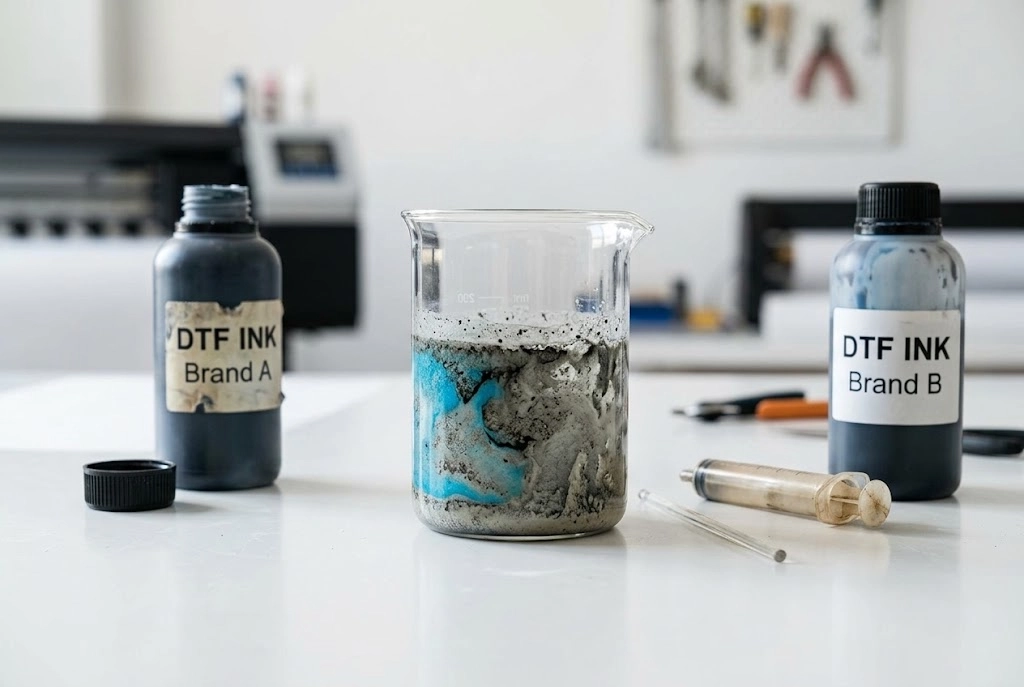
In short: No, never pour different DTF ink brands together directly. However, you can switch brands safely if you follow a proper flush process.
Below, we break down why direct mixing ruins your setup, what happens chemically inside your lines, and provide a step-by-step guide to safely flushing and swapping to a new ink brand without damaging your printhead.
Why People Consider Mixing DTF Ink Brands
Many users think about mixing inks for a few common reasons:
- Leftover inks from different suppliers that they don’t want to waste.
- Saving costs by topping up with a cheaper brand.
- Lack of awareness about how different formulas can affect performance.
On the surface, it seems harmless. But in reality, DTF inks aren’t interchangeable like simple dyes—they’re carefully formulated, and even small differences can cause big issues.
Risks of Mixing Different DTF Ink Brands
Mixing inks may look like a good idea, but here’s what can go wrong:
- Chemical Compatibility Issues – Not all brands use the same resin, pigment, or additives. When mixed, the inks may react badly, creating clumps that clog the printhead.
- Color Inconsistency – Each brand develops its ink for specific color profiles. Mixing them can produce uneven shades, muddy tones, or unexpected results.
- Printhead Damage – If sediment forms inside the ink, it can block nozzles and cause permanent damage. Repairs are costly.
- Warranty Concerns – Printer or ink system warranties may be voided if damage is traced back to mixed inks.
What to Do If You Accidentally Mixed DTF Inks?
⚠ Accidentally poured a bottle of new ink into a tank still holding your old supplier’s formulation? Do not attempt to “print it through” to clear it. The heat, pressure, and chemical reactions inside the dampers and nozzles will turn mismatched resins into solid sludge within minutes.
Follow this emergency rescue protocol immediately:
❗ CRITICAL FIRST STEP: Shut Down Immediately
Do NOT run head cleanings or keep printing. Forcing mixed ink through the lines will push reacting chemicals directly into your printhead nozzles.
- Hit the Emergency Stop / Power Off immediately: Press your printer’s emergency stop button, pause switch, or cut the main power immediately [00:42, 01:17].
- Cancel any active print queue: Cancel tasks on both your RIP software and computer console to prevent the carriage from firing ink [02:43, 03:44].
📺 Watch Tutorial:How to STOP or PAUSE Your DTF Printer Fast (Winnerjet Tutorial) to see emergency switch and pause operations in action [00:13, 00:42].
How to Safely Switch Between DTF Ink Brands (Step Guide)
If you are transitioning to a higher-quality formulation or switching suppliers, do not pour the new ink directly into your existing supply. Instead, follow this proven four-step flushing routine to protect your dampers, ink lines, and printheads from cross-brand chemical reactions.
Visual Walkthrough: Watch the complete procedure on our Winnerjet DTF printer below to see how our technicians pump lines clear, circulate cleaning solution, and draw fresh ink.
Watch: Winnerjet – How to Change DTF Printer Ink: Complete Step by Step Guide
Step 1: Drain the Old Ink System Thoroughly
Disconnect and draw residual ink: Close the ink valves and unplug the supply line fittings. Use a clean syringe to completely withdraw all leftover ink from the tanks, delivery lines, and dampers into a waste bottle.
Purge white ink circulation: Because white DTF ink settles quickly, thoroughly drain the recirculation loop and empty any sediment settled at the bottom of the tank.
Step 2: Flush with DTF Cleaning Solution
Run dedicated cleaning solution: Connect lines to a specialized DTF flush fluid and draw the cleaner through each individual channel separately using your suction tool.
Flush until completely clear: Continue pulling solution until the liquid runs 100% transparent and translucent, leaving zero traces of white sludge or color residue.
Step 3: Run the 1:1 “Cup Test” Trick
Mix a bench test sample: In a clean cup, mix equal parts (around 5 ml each) of the old and new ink brands.
Check for chemical clashes: Let it sit undisturbed for 2 to 4 hours. Any clumping, curdling, or jelly-like separation indicates high chemical incompatibility, confirming that a 100% clean line flush is mandatory.
Step 4: Load New Ink & Install a Matching ICC Profile
Fill and purge damper air: Pour the new ink into the tanks. Hold the dampers upright while drawing ink through to ensure they fill completely with zero trapped air bubbles, preventing nozzle starvation during printing.
Apply the new ICC profile: Ink formulations, pigments, and viscosities differ across brands. Import the new supplier’s official ICC color profile into your RIP software to avoid color shifts and over-saturation.
Expert Advice: Why Stick to One Ink Brand
Professionals agree: consistency is key. Here’s why using one ink brand is always better:
Stable Quality – You get the same results every time without surprises.
Machine Protection – Your printhead stays clean and lasts longer.
Easy Troubleshooting – If issues happen, you can identify the cause without worrying about a mix of products.
Cost Efficiency – Avoid wasted prints, rework, or expensive repairs from damaged parts.
Choosing the Right DTF Ink Brand
If you want bright colors, strong wash durability, and smooth printing, the ink you choose matters as much as the printer.
Look for inks that offer:
- Stable formulation (won’t separate or clog).
- High color vibrancy and saturation.
- Proven wash resistance for long-lasting prints.
👉 That’s why many businesses trust Winnerjet DTF Ink. Our inks are engineered for consistent results, smooth flow through printheads, and vibrant colors that keep customers happy. By sticking with one reliable brand, you avoid the risks of mixing and ensure your printer performs at its best.

Conclusion & CTA
Mixing DTF inks from different brands might seem like a way to save money, but it often leads to clogs, color issues, and costly repairs. For reliable printing and consistent results, it’s always best to use one trusted ink brand.
📩 Request Free Winnerjet DTF Ink Samples and see the difference in stability and print quality for yourself!
FAQs – Can You MIX DTF Ink Brands
Can mixing DTF ink brands damage my printer?
Yes. Chemical incompatibility can cause clogs, sediment, and even permanent damage to the printhead.
What happens to colors if I mix DTF inks?
The colors may become dull, uneven, or muddy because each brand uses its own formula.
Can I switch brands without mixing?
Yes, you can. But you should completely flush the printer system before adding a new ink brand.
How do I safely replace my ink brand?
Use a cleaning solution or flush kit to remove all traces of the old ink before filling with the new one.
Which DTF ink is best for long-term use?
Choose stable, professional inks like Winnerjet DTF Ink, trusted for consistent performance and vibrant results.