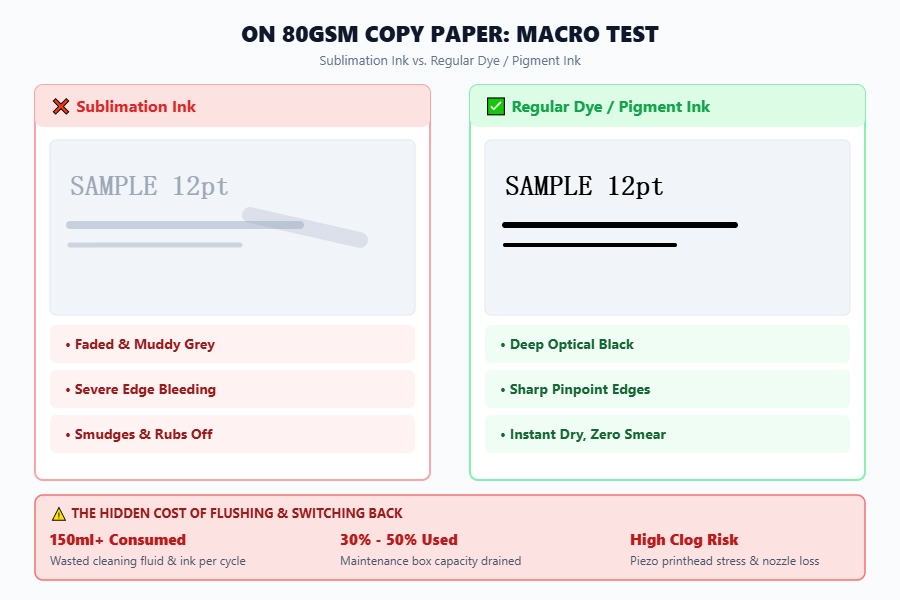
No. You cannot use sublimation ink for regular document or photo printing on plain paper. Sublimation ink requires high heat (380°F–400°F) and polyester fibers to activate; on plain copy paper, it produces dull, faded, and smudged prints while creating severe printhead clogging risks.
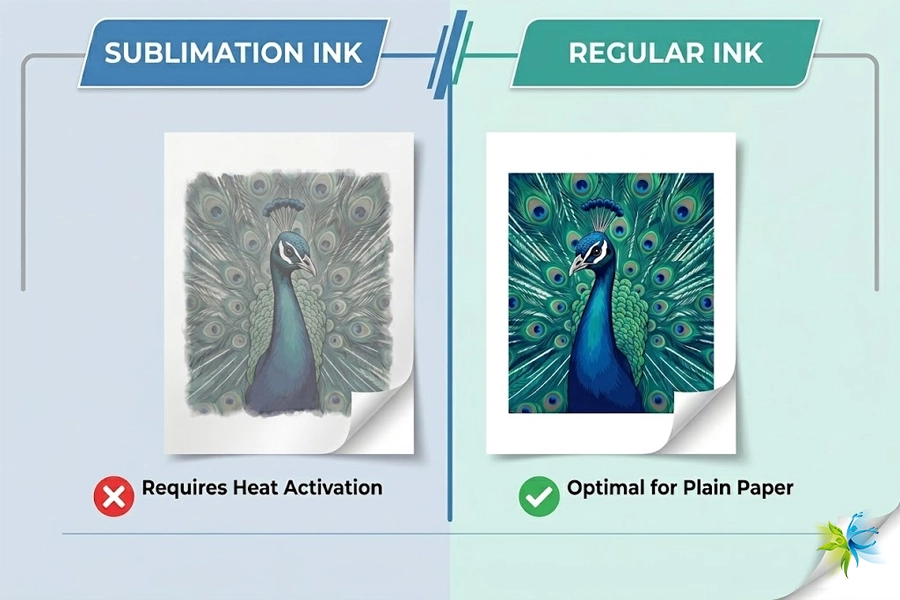
1️⃣ Sublimation Ink VS Regular Ink
At first glance, all inks may look the same, but sublimation ink is formulated for a special process.
- Chemical composition: Sublimation ink is a heat-activated dye that turns into a gas under high temperature and bonds with polyester or coated blanks.
- Different goals: Regular inks (dye or pigment) are designed to sit on paper surfaces and deliver crisp, lasting colors.
- Result mismatch: When sublimation ink is used on plain paper, it won’t bond properly, leading to dull or washed-out prints.
If you’re new to this technology, check out our comprehensive guide on what sublimation ink is and how it actually works.
| Feature | Sublimation Ink | Regular Ink (Dye/Pigment) |
|---|---|---|
| Primary Use | Heat transfer to polyester/coated items | Printing documents & photos on paper |
| Working Principle | Turns into gas under heat to bond with fibers | Dries on the surface of the paper |
| Result on Plain Paper | Dull, faded, and blurry colors | Sharp, vibrant, and clear images |
| Durability | Permanent, scratch-resistant, washable | Can fade over time or smudge if wet |
| Clogging Risk | Higher (requires frequent maintenance) | Lower (standard maintenance) |
| Media Required | Sublimation paper + Polyester fabrics | Standard copy paper / Photo paper |
👉 In short: sublimation ink is for fabric and coated substrates, while dye/pigment ink is for paper.
2️⃣ What Happens If You Use Sublimation Ink for Regular Printing?
If you try to cut corners by using sublimation ink in place of regular ink, here’s what you’ll face:
- Faded, dull colors – Text looks weak, images appear blurry.
- Ink doesn’t bind – Sublimation ink is not absorbed by normal paper.
- Printer damage risk – Frequent clogging and nozzle blockages.
- Increased costs – More cleaning cycles, wasted ink, and potential repairs.
This means you’ll spend more time and money maintaining your printer than you save by trying to reuse sublimation ink.
Users often wonder about the specific results on standard copy paper. Read our test results to see what really happens when using sublimation ink on regular paper, including why it fails during heat pressing

3️⃣ Best Alternatives for Regular Printing
So what’s the right solution? Stick to inks made for your purpose:
- Dye ink – Delivers bright, vivid colors; great for photos and documents.
- Pigment ink – Waterproof and fade-resistant; ideal for professional or archival prints.
- Winnerjet’s recommendation: Never run sublimation ink and standard ink through the same printer. Keep a dedicated desktop printer loaded with Winnerjet Dye or Pigment Inks for your daily paperwork, and a separate, dedicated unit powered by Winnerjet Sublimation Inks for heat transfer production.
4️⃣ Pro Tips for Choosing the Right Ink
To avoid problems, keep these practical tips in mind:
- ✅ Match ink to the media: Sublimation ink = polyester & coated blanks; pigment/dye ink = paper.
- ✅ Use separate printers for sublimation and everyday printing.
- ✅ Don’t mix ink types—always flush your printer when switching.
- ✅ Choose trusted suppliers like Winnerjet, whose inks are engineered for compatibility, smooth flow, and reduced clogging.
Conclusion
In summary, Sublimation ink cannot replace regular printing ink. It’s built for a heat-transfer process, not paper printing. For clear, long-lasting documents and photos, choose dye or pigment inks instead.
Whether you need high-density sublimation inks that pop on polyester or zero-clog dye and pigment inks for daily orders, Winnerjet manufactures precision-engineered formulas for all major Epson, Canon, and HP-based setups.
👉 Request a Free Winnerjet Ink Sample Pack or Talk to Our Ink Technicians to find the exact formulation for your printheads.
Can I use one printer (like an Epson EcoTank) for both sublimation and regular printing?
No, you should never share one printer for both tasks. Switching between sublimation ink and regular dye or pigment ink requires flushing all ink lines with 150ml+ of cleaning solution, consuming 30% to 50% of your maintenance box capacity each time. Additionally, chemical cross-contamination can cause severe ink coagulation and irreversible nozzle clogs. Running two dedicated desktop printers is significantly safer and cheaper.
Can you change a sublimation printer back to regular ink?
Yes, but the flushing process is costly and time-consuming. You must completely drain the ink tanks, flush the damper lines and printhead with specialized cleaning fluid until the lines run clear, and then refill with fresh dye or pigment ink. For entry-level desktop models, the cost of wasted ink, cleaning fluids, and a replacement maintenance box often approaches the price of a brand-new regular printer.
Can you mix sublimation ink and regular ink together?
Never mix sublimation ink with regular dye or pigment inks. Sublimation ink uses insoluble disperse dye particles suspended in high-viscosity carrier fluids, while regular inks use water-soluble dyes or different binder systems. Mixing them causes immediate chemical coagulation, forming precipitates that permanently ruin microscopic piezo printheads.
What happens if you use regular dye or pigment ink on sublimation transfer paper?
The heat transfer will completely fail. Regular inks cannot gasify or chemically cross-link with polyester fibers under high heat. When pressed at 385°F–400°F (195°C–205°C), standard ink will either scorch, bake onto the paper coating, or wash out completely during the first laundry cycle. Sublimation paper requires heat-activated disperse dye ink to transfer properly.
Why does sublimation ink look dull and smudge on standard copy paper?
Sublimation disperse dyes remain chemically inactive and unbonded without high heat (190°C–205°C), causing black text to look greenish-grey or brown on paper. Furthermore, standard wood-pulp copy paper lacks a specialized polymer coating to absorb and lock the high-boiling-point carrier fluids, causing severe line feathering and prints that smudge easily when handled.