It’s no secret: the printhead is the most expensive component of your DTG machine. But did you know that up to 80% of printhead damage is not caused by natural wear and tear, but by preventable ink sedimentation? Mastering “how to strain printer ink for DTG” is more than just a technical step—it’s the most effective way to avoid a $2,000 disaster and protect your investment.
With nearly 20 years of experience in the digital printing industry, Winnerjet views white ink maintenance as a science. Today, we are pulling back the curtain on professional straining methods and daily maintenance protocols.
The Hidden “Profit & Loss” Statement
In the daily hustle of a print shop, many owners view 15 minutes of ink maintenance as “wasted labor.” At Winnerjet, we see this as a serious miscalculation of operational costs:
Minimal Investment: 15 minutes of straining and inspection costs only a few dollars in labor.
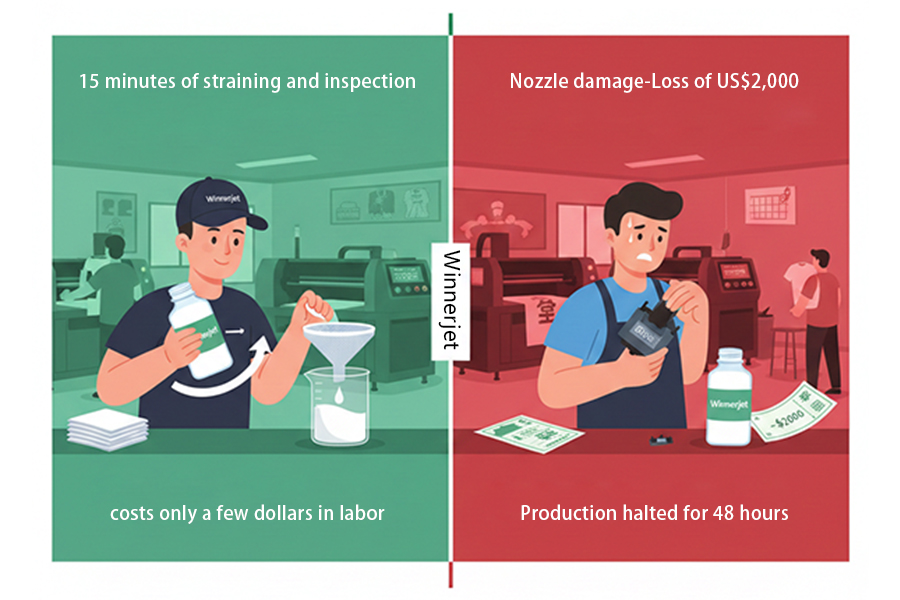
The Expensive Price of Failure: Once a printhead is damaged by sediment, you face a $2,000 hardware loss plus at least 48 hours of total production downtime.
Invisible Business Risks: Far more expensive than the hardware itself are the contract penalties from delayed orders and the collapse of trust from major clients regarding your delivery capabilities.
The Winnerjet Perspective: Straining ink isn’t “paying someone to do a chore”; it’s an insurance policy for your core assets. Consistent and stable delivery capability is your true profit margin.
Why Is Straining DTG White Ink Non-Negotiable?
In the world of DTG, white ink is both the soul of the print and the most difficult “beast” to tame. As a technical team with 20 years of experience, we must reveal a harsh truth: unstrained white ink is a ticking time bomb for your printhead.
This is because the core ingredient of DTG white ink is a high concentration of Titanium Dioxide. While this provides excellent opacity and brightness, its physical and chemical properties are notoriously unstable:
1. Particle Agglomeration: The Invisible “Gravel Road”
You might shake your ink bottles every day, but simple agitation often cannot overcome molecular attraction. Microscopic Titanium Dioxide particles naturally “clump” together when sitting still.
The Lethal Detail: These clumps often exceed the microscopic diameter of the printhead nozzles. Imagine a smooth fluid turning into “muddy gravel.” Once these clumps hit a multi-thousand-dollar printhead, they cause instant, irreversible physical blockages.
2. Chemical Precipitation: The Irreversible “Jelly Effect”
Because DTG ink is a complex suspension, it is extremely sensitive to temperature and shelf life. If your shop experiences drastic temperature swings or if you use ink that has been stored too long, the chemical binders will undergo irreversible decomposition.
The Pro Diagnosis: While straining, if you notice residue on the filter that looks like “clear jelly,” “sugar crystals,” or “stringy fibers,” proceed with extreme caution.
Winnerjet Red Alert: This indicates the ink has chemically deteriorated. Straining only removes the solids but cannot restore the chemical stability of the liquid. Forcing this ink through your machine will not only kill the printhead but also allow the deteriorated gel to coat the entire CISS tubing, leading to total system contamination.
3. Straining is Not Just Cleaning—It’s a “Physical Awakening”
Professional straining through fine nylon mesh actually provides a shear and homogenization treatment for the ink. It forcibly breaks down tiny particle chains, ensuring that what enters your machine is a true nano-scale fluid.
Winnerjet Summary: Straining ink isn’t a waste of time; it’s an insurance policy for your production. Rather than spending days on expensive repairs after a clog, it is far better to spend 5 minutes a day on professional physical straining.
How to Strain Printer Ink for DTG Correctly?
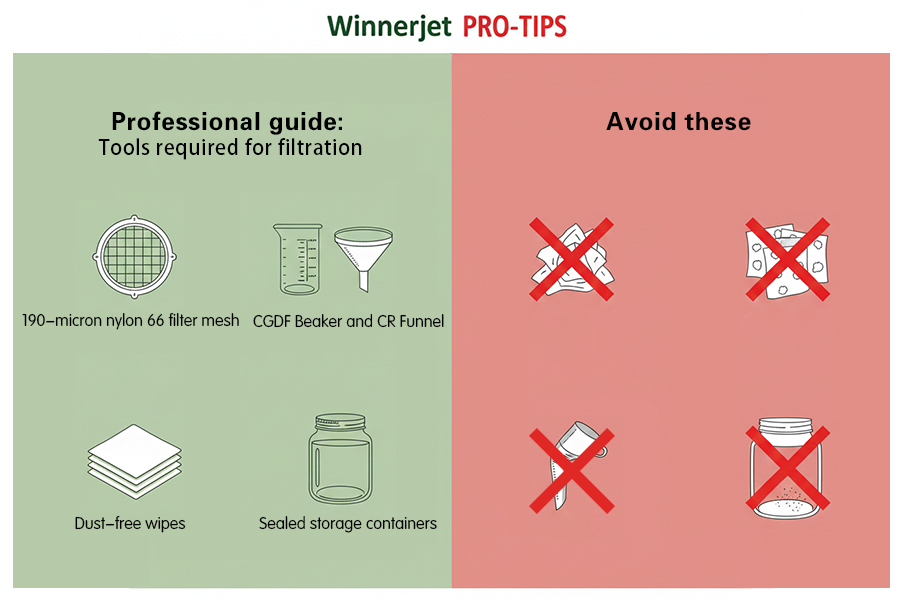
To ensure maximum ink flow and printhead longevity, verify you have the right professional tools on your workbench before starting. Using household substitutes (like coffee filters or paper towels) is often a hidden cause of printhead damage.
For example: Optimizing Your Brother GT-541 Print Head Cleaning Process
Proper cleaning of the Brother GT-541 print head actually begins long before you run the software-driven automatic cleaning routine. While the printer’s built-in maintenance functions are crucial, using high-quality, pre-filtered DTG ink remains the most effective way to reduce the frequency of manual print head cleaning. By filtering the ink through a 190-micron mesh screen before dispensing it into a CGDF beaker, you can effectively prevent minute ink particles from entering the nozzles. This proactive preventive strategy minimizes the mechanical wear and tear associated with the Brother GT-541 print head cleaning process, thereby ensuring that your expensive print head remains free of clogs and extending its overall service life.
Required Professional Tools (Required Tools)
190-Micron Nylon 66 Filter: The core tool used to precisely intercept agglomerated particles.
Lint-Free Beaker (Lab/Food Grade): Used to hold the strained ink. Choose a clear, graduated container to observe the ink’s condition.
Stainless Steel or Chemical-Resistant Funnel: To support the filter and ensure a stable, spill-free process.
Lint-Free Wipes: To clean up residue without introducing fiber dust.
Sealed Storage Container: (If not pouring into the tank immediately) Used for degassing and preventing dust contamination.
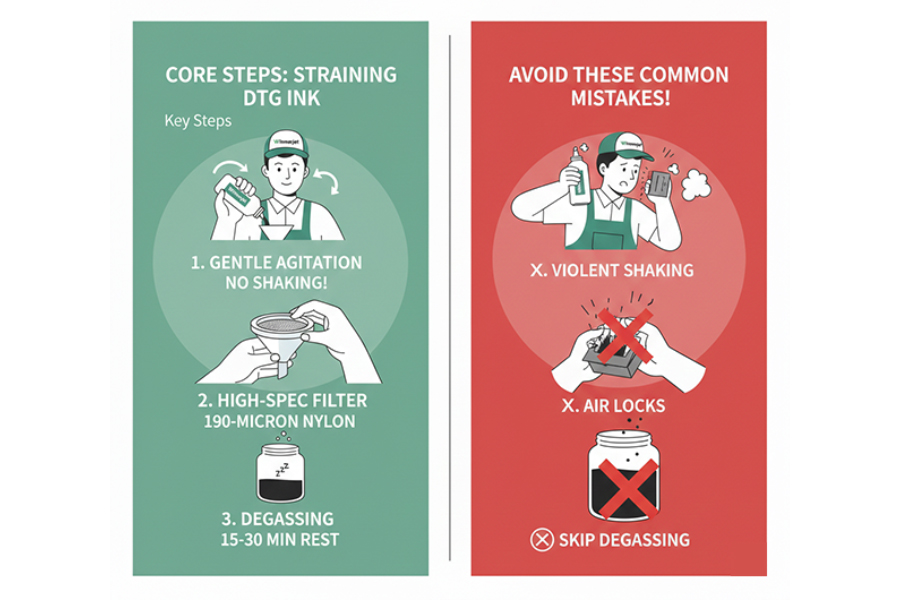
Core Operation Steps (Key Steps)
Please strictly follow these three professional straining steps. This is more than a cleaning process—it is the key to restoring the physical performance of your ink:
Gentle Agitation: Before straining, slowly rotate and flip the ink bottle for 1 minute to redistribute the pigment. Note: Avoid violent shaking. Intense agitation introduces excess air into the ink, creating micro-bubbles that disrupt the subsequent pressure balance.
Selection of High-Spec Filters: You must use a 190-micron or finer Nylon 66 mesh filter. This material offers excellent chemical resistance and will not shed fibers during the process. In contrast, cheap paper filters can easily shed tiny paper fibers that cause permanent physical blockages once they enter the printhead.
Degassing (Information Gain): This is a critical step that most operators overlook. While straining removes particles, the fluid creates a massive amount of nearly invisible “micro-bubbles” as it passes through the mesh.
Winnerjet Pro Recommendation: Let the strained ink sit in a dark place for 15–30 minutes before pouring it into the ink tank.
Technical Principle: This step allows micro-bubbles to fully escape, preventing them from gathering in the printhead chamber to form an “Air Lock.” Only total degassing avoids sudden dropouts or ghosting during printing, ensuring continuous stability from the piezo element.
Common Shaking Myths
In the DTG industry, “shaking white ink daily” is treated as gospel. However, Winnerjet’s 20 years of service data reveals a shocking fact: over 30% of dropouts, ghosting, and poor color issues are actually caused by shaking the ink too aggressively.
1. The “Micro-bubble” Myth: The Invisible Killer
When you shake an ink bottle like a soda, you might mix the pigment, but you are also whipping thousands of nano-bubbles into the high-viscosity white ink.
Physical Trait: These micro-bubbles rise extremely slowly in thick white ink and are invisible to the naked eye. If you pour this ink into your machine immediately, the bubbles travel straight through your supply lines.
2. Real-World Consequence: From “Air Lock” to “Dry Firing”
Once these micro-bubbles enter the printhead chamber, they undergo “Coalescence”—small bubbles merge into large ones.
Consequence: Air is compressible. When the piezo element fires, the air bubble absorbs the pressure, meaning no ink is pushed out. This is why many users report: “I strained the ink and shook it well, but the white ink suddenly disappears mid-print. It comes back after a clean, but drops out again 10 minutes later.”
Diagnosis: This is not a clog; it is a classic “Air Lock” phenomenon.
3. Professional Correction: Treat Your Ink Like Fine Wine
True professional technicians never shake ink bottles violently. The Winnerjet Lab recommends the “180° Slow Rotation Method”:
The Movement: Hold the bottle with both hands. Slowly flip it 180 degrees, let it sit for 2 seconds, then flip it back. Repeat for about 1 minute.
Core Value: This “Low-Shear” method uses gravity to let sediment slide and mix naturally while ensuring zero air entrainment.
Winnerjet Technical Summary: Uniformity does not require foam. Learning to let your ink “awaken in tranquility” is the first step in protecting your $2,000 printhead.
DTG Ink Maintenance Tips
To maximize printhead life and ensure consistent color, please follow the standardized maintenance cycles based on Winnerjet’s 20 years of industry experience.
Daily Routine
The goal is to prevent initial sedimentation in the precision nozzles through high-frequency micro-adjustments.
Activate White Ink Flow: Before starting the machine each day, gently rotate the ink bottles or manually trigger the WIMS (White Ink Management System). This re-disperses Titanium Dioxide particles before they can settle at the bottom of the lines.
Nozzle Check: Print your first test page every morning. Observing the integrity of the white ink lines allows you to immediately judge the health of the supply system.
Deep Clean Core Components: Use lint-free swabs and cleaning solution to remove dried ink from the Wiper and the edges of the Cap Top. This residue breaks the vacuum seal during suction, causing the head to dry out.
Weekly Routine
The goal is a systematic audit to prevent small issues from turning into expensive hardware costs.
Monitor Pump Suction: Observe the waste tube during a cleaning cycle. If suction is weak or flow is sluggish, the printhead will dry out due to a lack of proper negative pressure maintenance, regardless of ink quality.
Inspect Inline Filters: Carefully check your Disk Filters. If the filter element appears dark or shows visible clumps of pigment, it has reached its capacity and must be replaced immediately.
Environmental Control: Strictly monitor and log the humidity of your workspace. The optimal humidity for DTG printing is 40%–60%. Low humidity is the primary cause of ink skinning and clogging on the nozzle plate.
Maintenance Expert Advice (Pro Tips from Winnerjet):
“Preventative maintenance costs only 1% of a printhead replacement. By auditing your pumps and filters weekly, you avoid over 90% of emergency downtime.”
Why Do Global Users Trust Winnerjet?
In the DTG industry, choosing the right maintenance tools is as important as choosing high-quality ink. Winnerjet is more than just a supplier; we are the “Technical Bodyguard” for your production line.
1. 20 Years of Technical Heritage: Understanding Heads at a Molecular Level
We don’t just sell ink; we understand the internal fluid dynamics of every Epson, Ricoh, or Starfire printhead.
What Competitors Don’t Tell You: Many suppliers only care about color. Winnerjet focuses on the Surface Tension and Viscosity Curve relative to temperature. Our heritage ensures that white ink remains stable at a nano-scale even in extreme printing environments.
2. Exclusive: Strict “Batch Consistency” Protocols
Global wholesalers trust us because of Winnerjet’s rigorous Batch Traceability Management.
The Differentiator: We know the biggest fear in DTG is “this batch works, the next one clogs.” Every batch of Winnerjet ink undergoes a 48-hour extreme temperature simulation before leaving the factory to ensure your current bottle performs exactly like the last one.
3. USA Warehouse Support: Racing Against Time
For B2B clients, one day of downtime equals thousands of dollars in lost orders. We know that maintenance parts (190-micron filters, disk filters, cleaning solutions) are consumables. By maintaining a USA-based warehouse, we provide more than just products—we provide “Downtime Rescue Services.” When your filters reach capacity, our local stock ensures you don’t have to wait for international logistics.
4. Expert Advisory Support: We Don’t Just Sell, We Teach
As demonstrated in this article, Winnerjet provides guidance ranging from agglomeration diagnosis to waste system monitoring. Our goal is to resolve risks through science before you ever have to scrap a $2,000 printhead.
Conclusion: Habits Dictate Cost, Professionalism Dictates Profit
Maintenance is not an emergency repair; it is a refined form of asset management. Mastering the professional details of “How to strain printer ink for DTG” is the key to saving thousands in hidden expenses.
Do you need a professional maintenance kit or high-stability white ink for your shop?
👉 [Contact Winnerjet Official – USA Warehouse Stock Available for High-Efficiency Production!]