As a supplier of printing consumables, we would like to remind you: always print on the matte, coated side (the ink absorption layer)—never the shiny or anti-slip backing.
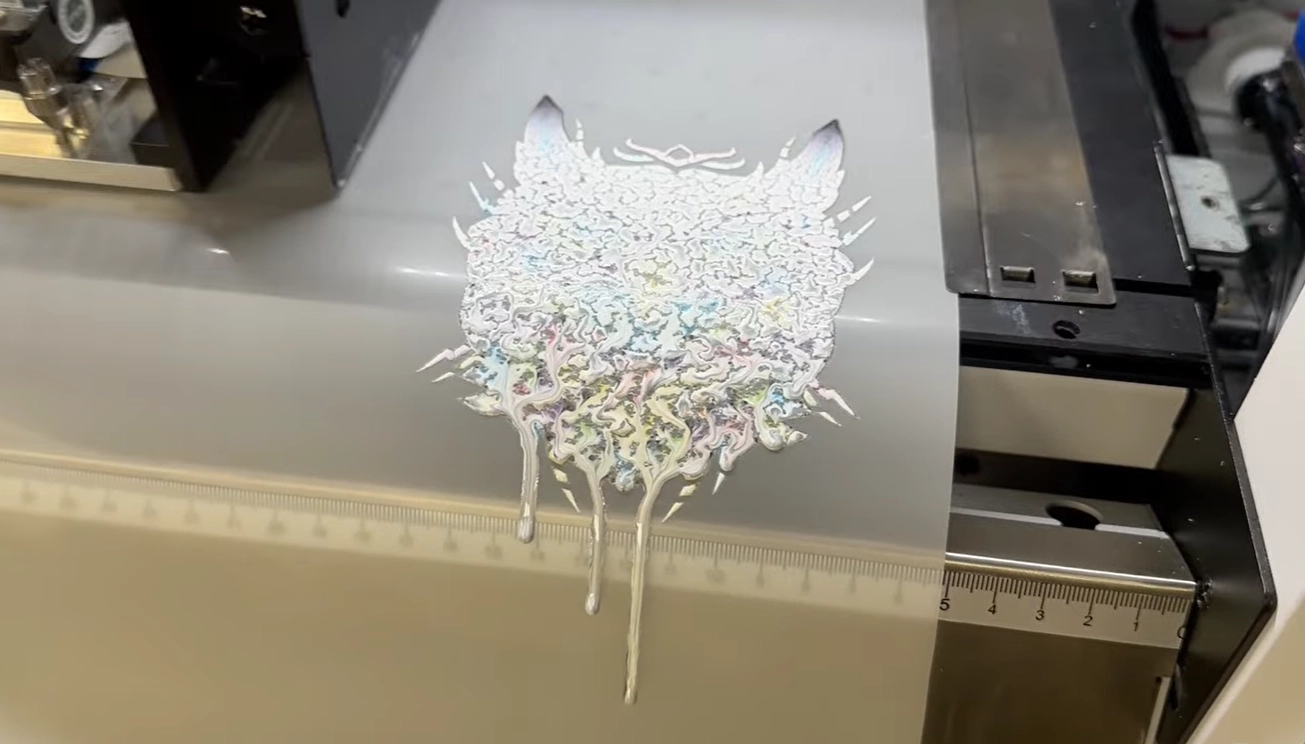
Loading the film backward doesn’t just waste a sheet—it causes severe ink pooling, bleeding, and surface cracking as the wet ink slides across the non-porous anti-slip layer. Worse, excess wet ink can smear onto your printer rollers and ruin future runs.
Modern DTF transfer films often feature a matte anti-static coating on the back, making both sides appear identical under ordinary workshop lighting. Don’t guess and ruin an entire batch. Here is how to accurately identify the printable side in seconds using simple visual, tactile, and flashlight tests.
1️⃣ Understanding the Two Sides of DTF Film
Not all DTF films are constructed the same way, which is why identifying the print side can sometimes be confusing:
Single-Sided Matte Films (Traditional & Easiest to Tell):
Glossy side → Smooth, reflective, and shiny PET base. This is the non-printable backing.
Matte side → Treated with a specialized ink absorption coating that locks in DTF inks and adhesive powder. One side is clearly shiny and the other is flat, making identification instant.
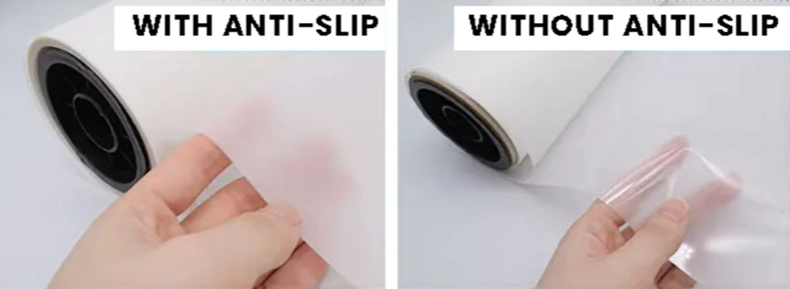
Double-Sided Matte Films (Modern Anti-Slip Design):
Why do both sides look matte? Many premium DTF films add an anti-slip (or anti-static) layer to the back side to prevent paper-feed slipping, roller jams, and static cling inside the printer.
The Trap: Because the anti-slip backing is also frosted and non-reflective, both sides can look deceptively similar. However, only the side with the ink absorption layer can accept ink—printing on the anti-slip layer will cause ink pooling, bleeding, and cracking.
Winnerjet DTF transfer films feature a precisely engineered dual-coating system: a high-traction anti-slip backing for flawless paper feeding, paired with a distinct, ultra-absorbent matte printing layer that is easy to distinguish and guarantees crisp, vibrant transfers every run.
💡 Want to know more about single-sided vs, double-sided coatings, hot peel vs. cold peel, and how to pick the right film for your business? Read more in our complete guide: What is the Best DTF Film?

2️⃣ How to Identify the Printable Side (3 Quick Tests)
Not sure which side is which—especially on double-sided matte films? Try these 3 quick, fail-proof checks:
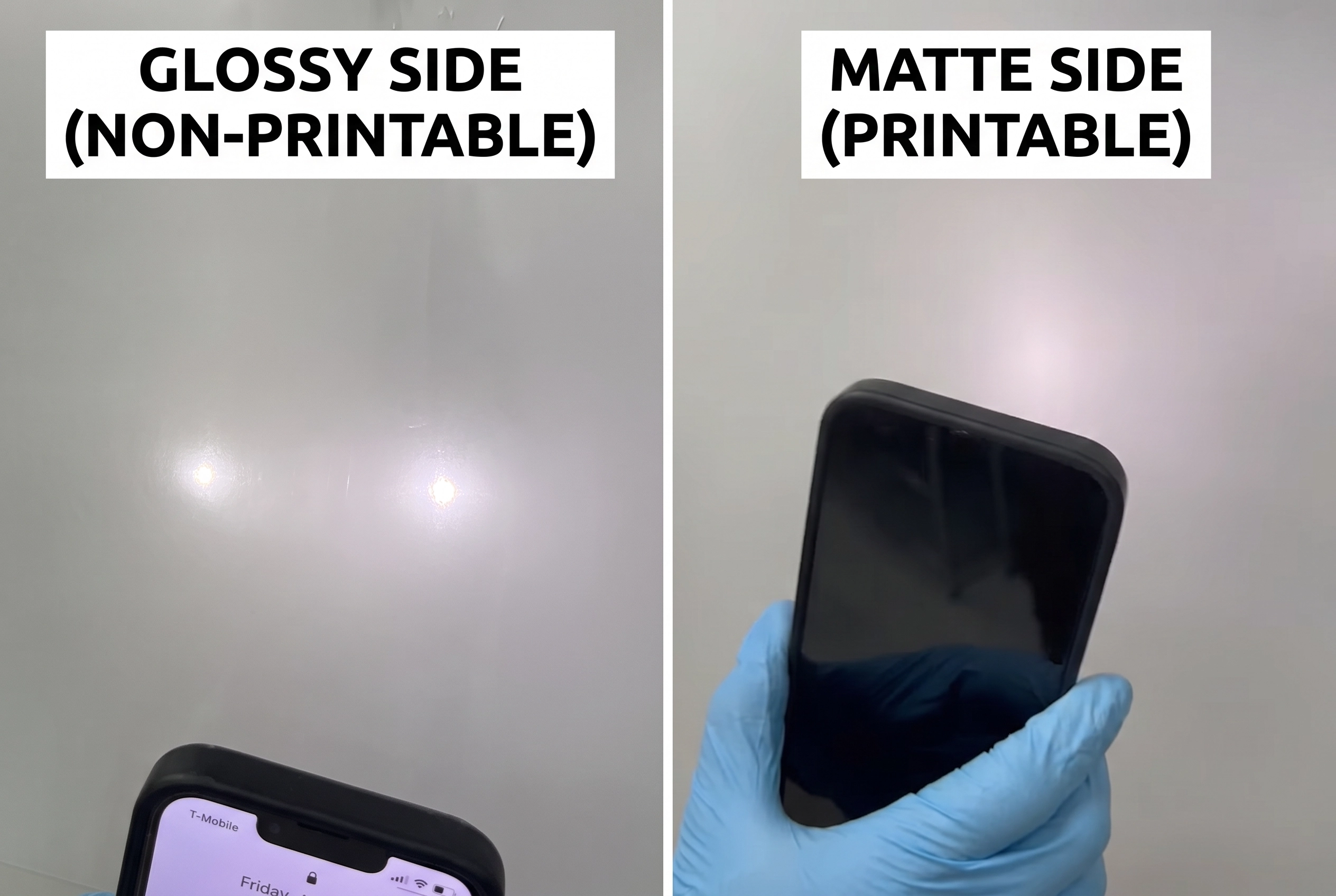
1. The Smartphone Flashlight Test (The 3-Second Pocket Hack):
Turn on your phone’s flashlight and shine it directly onto the film surface:
Non-printable side (Anti-slip / Glossy backing) → You will see a sharp, visible reflection of the LED bulb. The light bounces right off the surface.
Printable side (Ink absorption layer) → The light gets completely diffused and “flushed out”—you cannot see the LED bulb reflection at all, only a dull, flat glow.
(💡 Pro Tip: This is the fastest way to tell when both sides look matte to the naked eye!)
2. The Touch & Grip Test:
Gently rub a corner of the film with your thumb:
Printable side → Feels slightly rougher, grippy, or tacky because of the porous ink-receptive coating.
Backing side → Feels distinctly smoother and slicker with much less resistance.
(⚠️ Note: Wear clean lint-free gloves when handling full sheets to prevent hand oils from damaging the absorption coating.)
3. The Scratch Test (Last-Resort Check):
Lightly scratch the very edge or corner of the film with your fingernail:
Printable side → Leaves a faint, chalky line where the fingernail scrapes the coating layer.
Glossy / Backing side → The surface will not flake or leave a mark.
3️⃣ Common Mistakes to Avoid
Many beginners run into the same problems when learning to use DTF films:
❌ Printing on the glossy side → ink won’t stick and will smear.
❌ Handling films with oily hands → damages the coated surface.
❌ Forgetting to check before loading → wastes ink and film.
💡 Pro Tips for Flawless Handling:
Wear lint-free nitrile gloves: Always wear clean gloves when opening packs, sorting sheets, or loading the printer. This simple habit keeps the ink-absorption coating pure and eliminates oil-spot rejects entirely.
Do the 3-second quick check: Double-check the print side every single time you reload—even if you think you remember how the sheet was placed in the box.
4️⃣ Pro Tips for Consistent Results
To keep your production smooth:
- 📦 Store properly → Keep films flat, dry, and away from dust.
- 🖨 Load consistently → Always place films the same way in your printer to avoid mistakes.
- ⭐ Choose quality films → Brands like Winnerjet DTF Film make side identification easy thanks to their uniform coating. This helps you focus on printing, not troubleshooting.
✅ Conclusion & CTA
To sum it up: always print on the matte, coated side of your DTF film. Use the touch, scratch, or shine test to double-check, and you’ll avoid misprints and wasted material.
👉 For businesses looking for reliable and easy-to-use supplies, Winnerjet DTF films are designed with a stable coating that makes the printable side simple to identify and ensures consistent results.
✨ Need dependable DTF materials for your production? Request a free Winnerjet sample today and print with confidence.
❓ FAQs DTF Film
What happens if you print on the wrong side of DTF film?
If you print on the non-coated (glossy or anti-slip) backing, the ink cannot absorb. It will immediately begin beading, bleeding, and pooling into puddles, and once dry, the design will crack. Additionally, the excess wet ink risks smearing across your printer’s rollers and pinch wheels, requiring thorough cleaning.
What does "double-sided" DTF film mean? Can you print on both sides?
No, you cannot print on both sides. “Double-sided” does not mean double-sided printing; it means the film has two different functional coatings: an ink absorption layer on the front for printing, and an anti-slip / anti-static coating on the back to improve paper feeding and roller traction. You must still only print on the front coated side.
How do you tell the print side on double-sided matte DTF film?
Use the Smartphone Flashlight Test. Turn on your phone’s flashlight and shine it at the sheet:
Printable Side: The light flushes out into a soft, diffused matte glow without any bulb reflection.
Non-Printable Side (Anti-slip Backing): You will clearly see the sharp, bright reflection of the LED bulb on the surface.
Why is my DTF print showing white fingerprint marks?
This is caused by handling the printable surface with bare hands. Natural skin oils and sweat contaminate the micro-porous ink-receptive layer, preventing the DTF ink from adhering properly. Always handle transfer sheets by their extreme edges or wear clean, lint-free nitrile gloves during loading.
What happens if I print on the wrong side?
The film is wasted and can’t be reused. Always check first.